Everything you need to keep your HSA audit-ready
SnapHSA turns a pile of medical receipts into an organized, searchable record, and tells you exactly how much you can reimburse yourself tax-free.
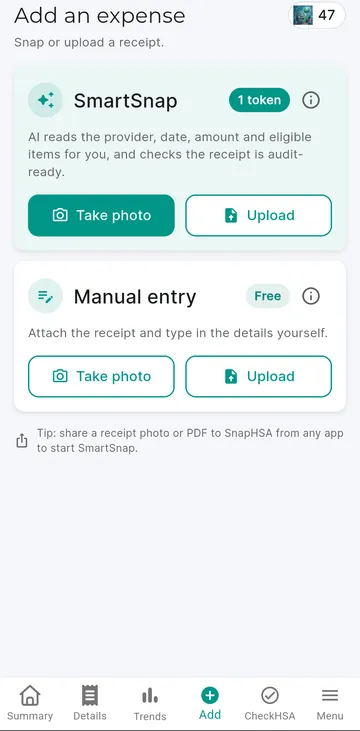
SmartSnap receipt scanning
Take a photo, upload a PDF, forward an email receipt to receipts@snaphsa.app, or share a receipt to SnapHSA from any app. SmartSnap reads the provider, date, amount and eligible items, and checks that the receipt has what an audit needs. Review what it found, edit if needed, and save. The original image stays attached to your record.
- Works with photos, PDFs and screenshots
- Email receipts: forward them to receipts@snaphsa.app and approve them in the app
- Bulk import: pick up to 25 photos or PDFs at once, then review them in your Receipt inbox
- Flags items that may not be eligible, like groceries on a pharmacy receipt
- Manual entry is always free if you'd rather type it yourself
CheckHSA eligibility checker
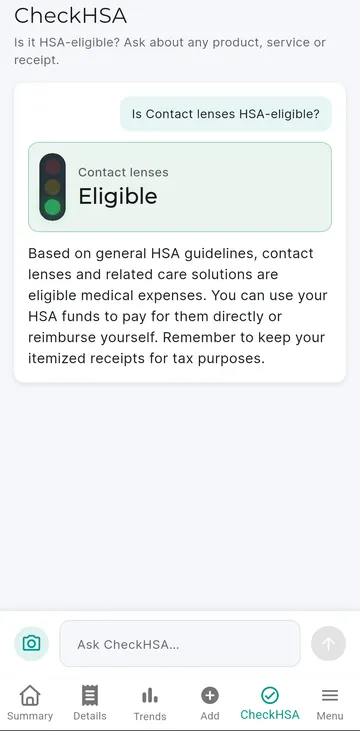
Not sure if something counts? Ask CheckHSA about any product or service, or snap a photo of it. You get a stop-light answer with a short explanation based on general HSA guidelines.
- Green: eligible
- Yellow: maybe, often needs a letter of medical necessity
- Red: not eligible
Reimbursement bank and audit checks
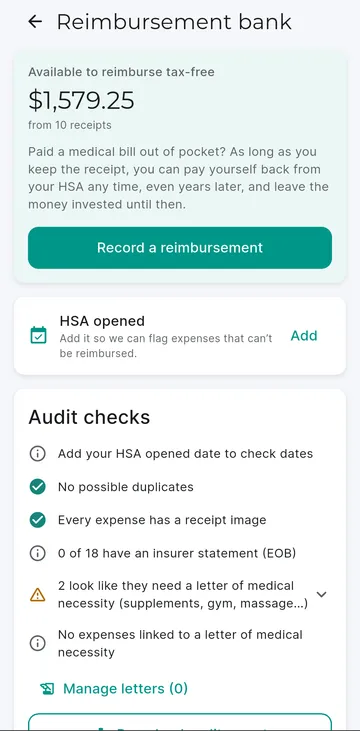
See how much you can reimburse yourself tax-free, from which receipts. Record each HSA withdrawal and match it to the receipts it paid back, including partial reimbursements, and undo it if you need to. Built-in audit checks catch the things that cause trouble later.
- A PDF for each reimbursement, with every receipt and document it covers
- A tax-year PDF report and a yearly audit report
- Several documents per expense: receipt, insurer statement (EOB), proof of payment and extra pages
- Possible duplicates, missing receipt images and expenses dated before your HSA opened
Letters of medical necessity
Some expenses, like supplements, gym memberships or ergonomic gear, are only eligible with a letter from your doctor. Keep each letter with the expenses it covers, see which are active or expiring, and get a reminder when an expense likely needs one.
- Link one letter to many expenses
- Active, expiring soon and expired at a glance

Share with your household
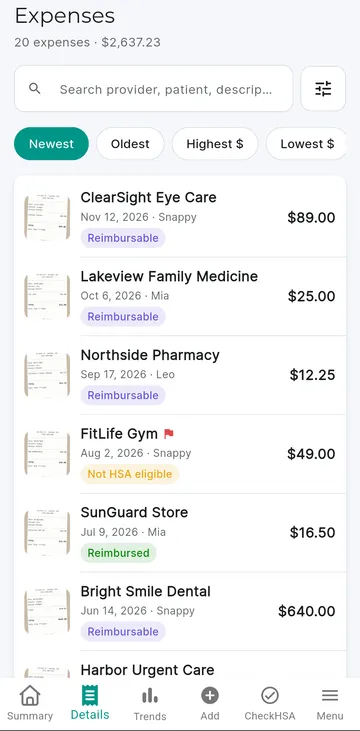
Track expenses for everyone covered by your HSA, and share SnapHSA with your spouse or family. Up to 4 people see and manage the same expenses, receipts, letters and reimbursements, each with their own sign-in and tokens. Search, sort and filter every receipt by person, provider, date or status.
- Invite with a code; leave anytime
- Fast search across every receipt
Trends and growth
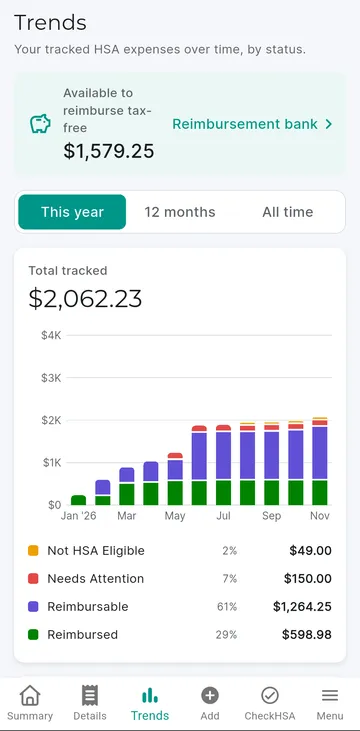
See your HSA spending over time by status: reimbursed, reimbursable, needs attention and not eligible. Then see what leaving the money invested could earn, from high-yield savings to the S&P 500.
- Spot what still needs a receipt
- Compare growth scenarios
Export and back up anytime. Your data is yours.
Download a spreadsheet of your expenses for your tax preparer or HSA administrator, a ZIP with every receipt image, or back everything up to your own Google Drive.
- CSV spreadsheet with dates, providers, amounts and status
- ZIP of all your receipt images
- Google Drive backup: every receipt, document and letter plus a spreadsheet, in a folder you own. Only new files are copied each time
- Save a clean copy of any receipt to your phone, named by provider and date (for example, CVS_Pharmacy_05-22-2026.jpg)

And the details that matter
iPhone, Android and web
One account on every device. Start on your phone, finish on your laptop.
App lock and two-step verification
Lock the app with Face ID or your fingerprint, and protect your account with an authenticator app.
Share to SnapHSA
Send a receipt from your email, files or photos straight into SmartSnap (Android).
English and Spanish
The whole app, CheckHSA included, works in both languages.
Start your HSA receipt vault today
Free to download. Track expenses by hand for free, and use tokens only when you want SmartSnap to do the typing.